
make marketing affordable now!


|
|---|
 Email Setup:
Email: |
me@my-domain.co.za |
| Incoming (POP) server : | mail.my-domain.co.za |
| Outgoing (SMTP) server : | smtp.my-domain.co.za |
| Account / User Name : | me@my-domain.co.za |
| SMTP Authentication : | Enabled (same Username as POP) |
| Note: If SMTP Authentication is not catered for by your email program, you must rather use your ISP's SMTP server. | |
| SMTP Port : | 587 |
Your email is also available online via Webmail.
Launch Windows Live Mail
1. Launch Windows Live Mail
2. Select Accounts from the top menu bar and then the Email icon from the top left
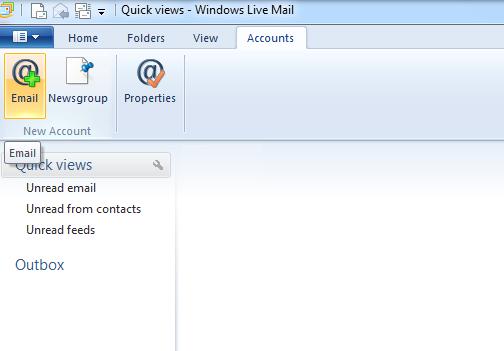
Create new account
3. Enter the email address and password, then ensure that the Manually configure server settingscheckbox is ticked
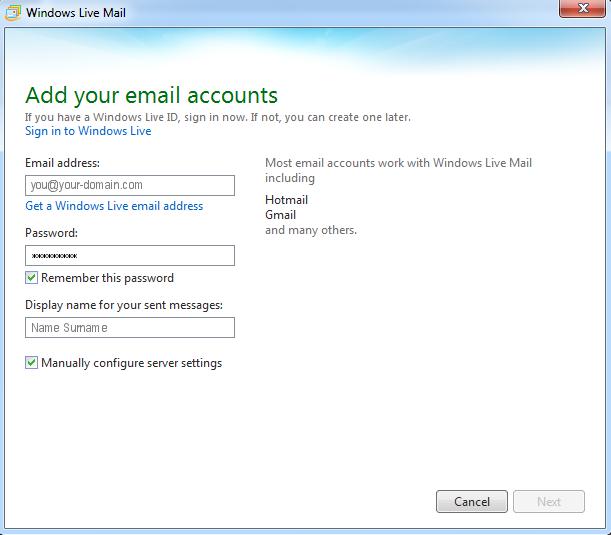
Configure server settings
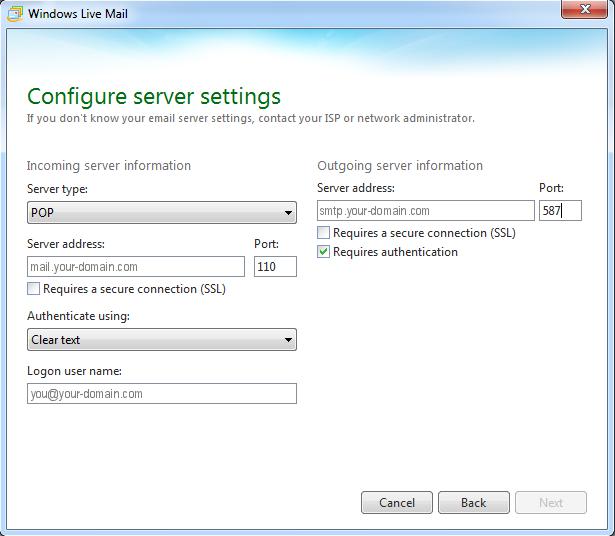
4. Select “POP” as the Server type and then change your outgoing port number to 587.
5. Ensure that the Logon user name is your entire email address and click “Next”
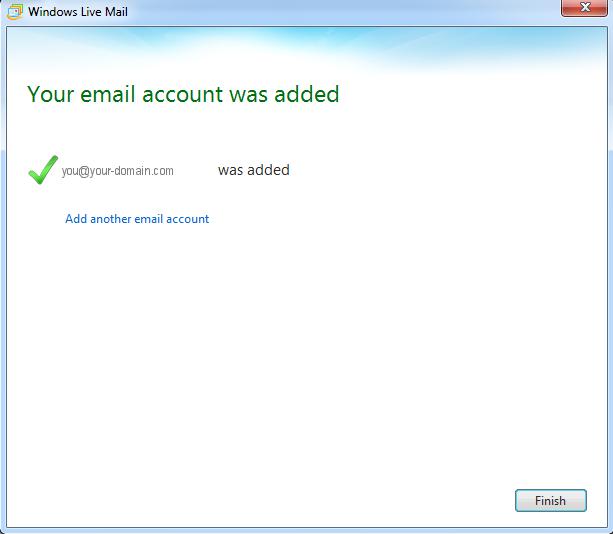
Complete Setup
6. Once prompted, you can complete the setup by clicking “Finish“.
7. If your email is still not working, please read our Troubleshooting Guide